
בקשה | מכיר את ספריא? צריך אותך!>>
-
אמר שזה בתוכנית שלו, ליצור כזה דבר.
השאלה, אם בתכנית שלו לתת לנו...
@י.-פל. למה לא?
זה היה נשמע שזה עבור זית.
בכל מקרה אפשר לשאול אותו. -
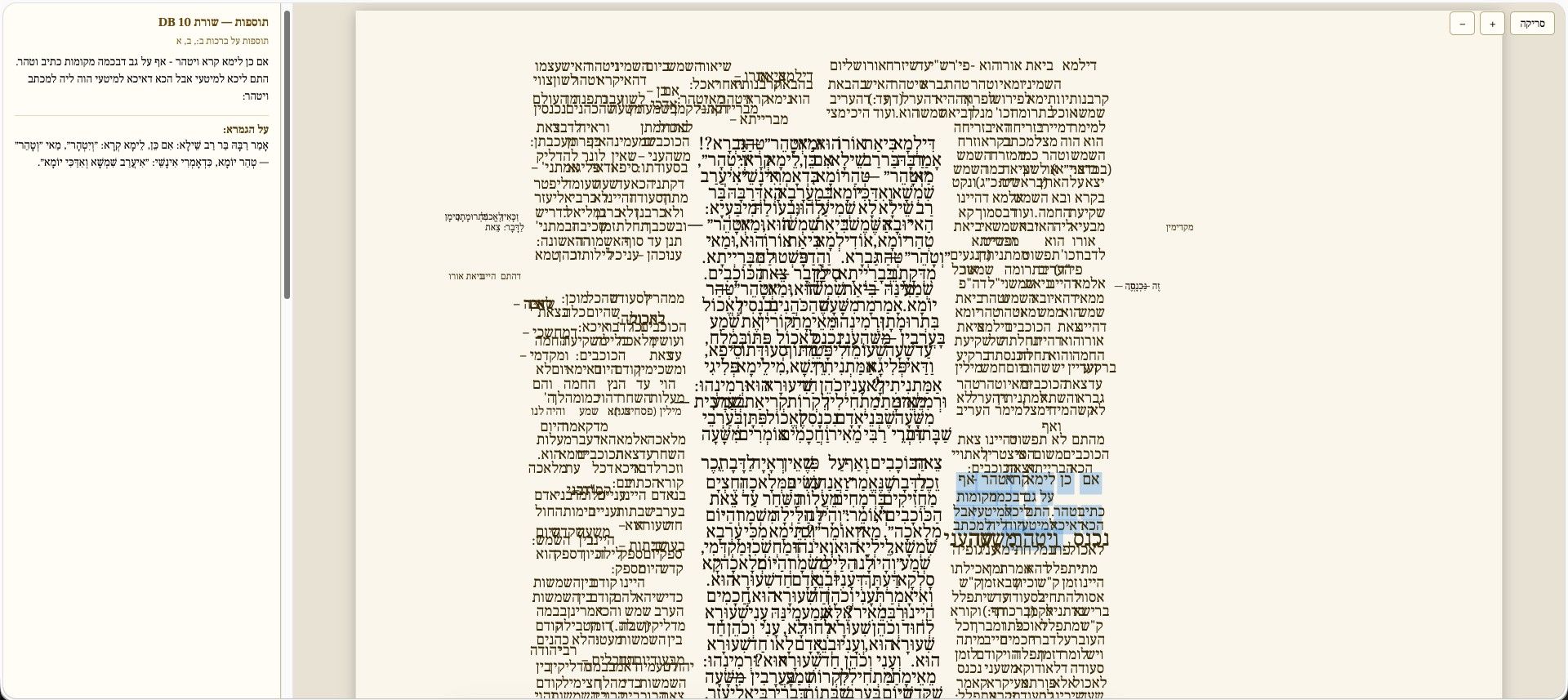
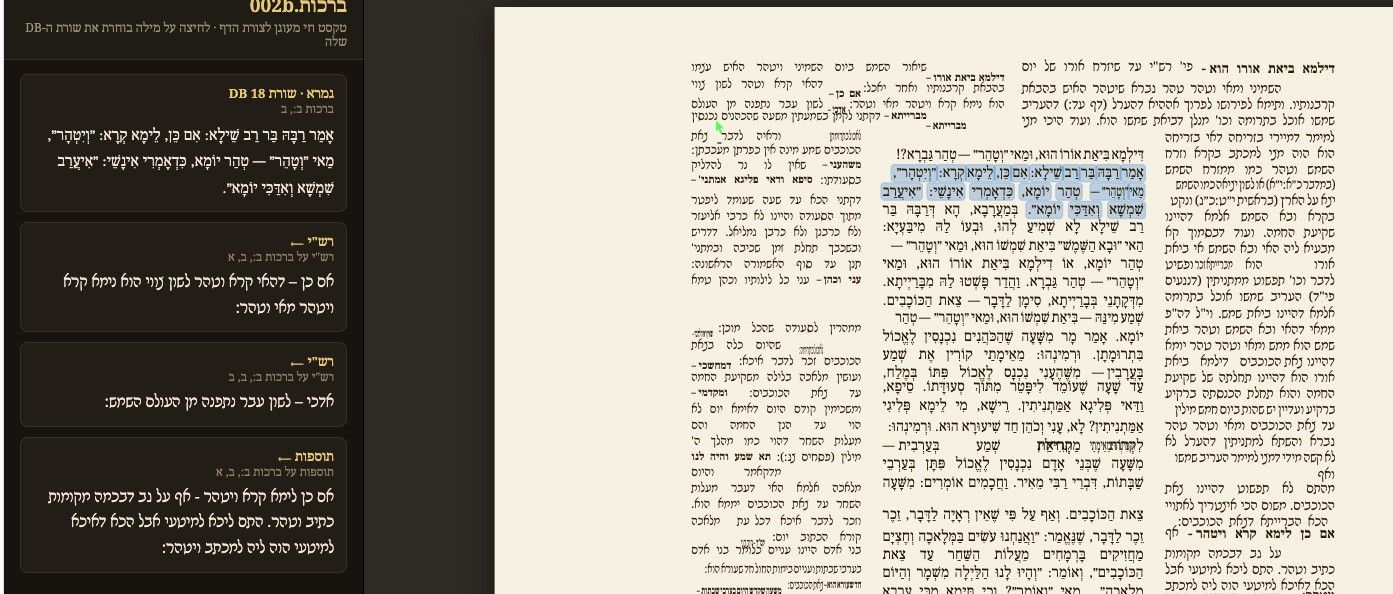
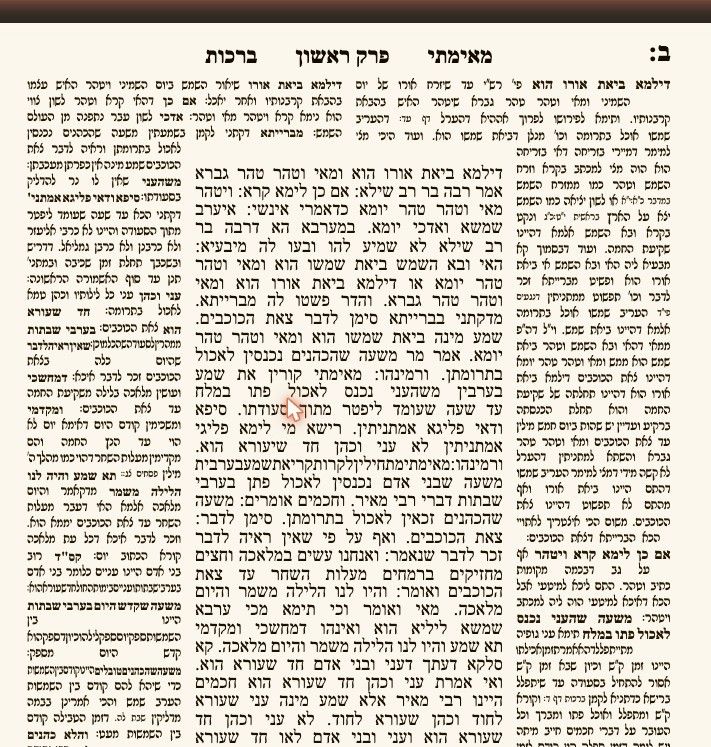
אם אני זוכר נכון יש בספרייא דבר חשוב מאוד שאין באוצריא: צורת הדף אמיתית, פעילה.
לא ידוע לי על דבר כזה.
צריך שיאמר מי שעומד בכללי הכותרת:
מכיר את ספריא? צריך אותך!>>
מה שאני יודע על ספרייא - הוא מלפני הרבה מאוד זמן
עי' https://mitmachim.top/post/602644
ועי' https://mitmachim.top/post/612659
אולי אני לא זוכר נכון?
בכל אופן עי' כאן https://github.com/Yiddishe-Kop/Shas-Vilna
ועוד יותר כאן
https://yiddishe-kop.com/articles/ravtext-seforim-publishingסתם בלבול ראש?
אם תהיה אפשרות להכליל זאת באוצריא קדישא -
היא תייתר את הצורך של התוכנות האחרות לנסות להשתדרג... -
-
-
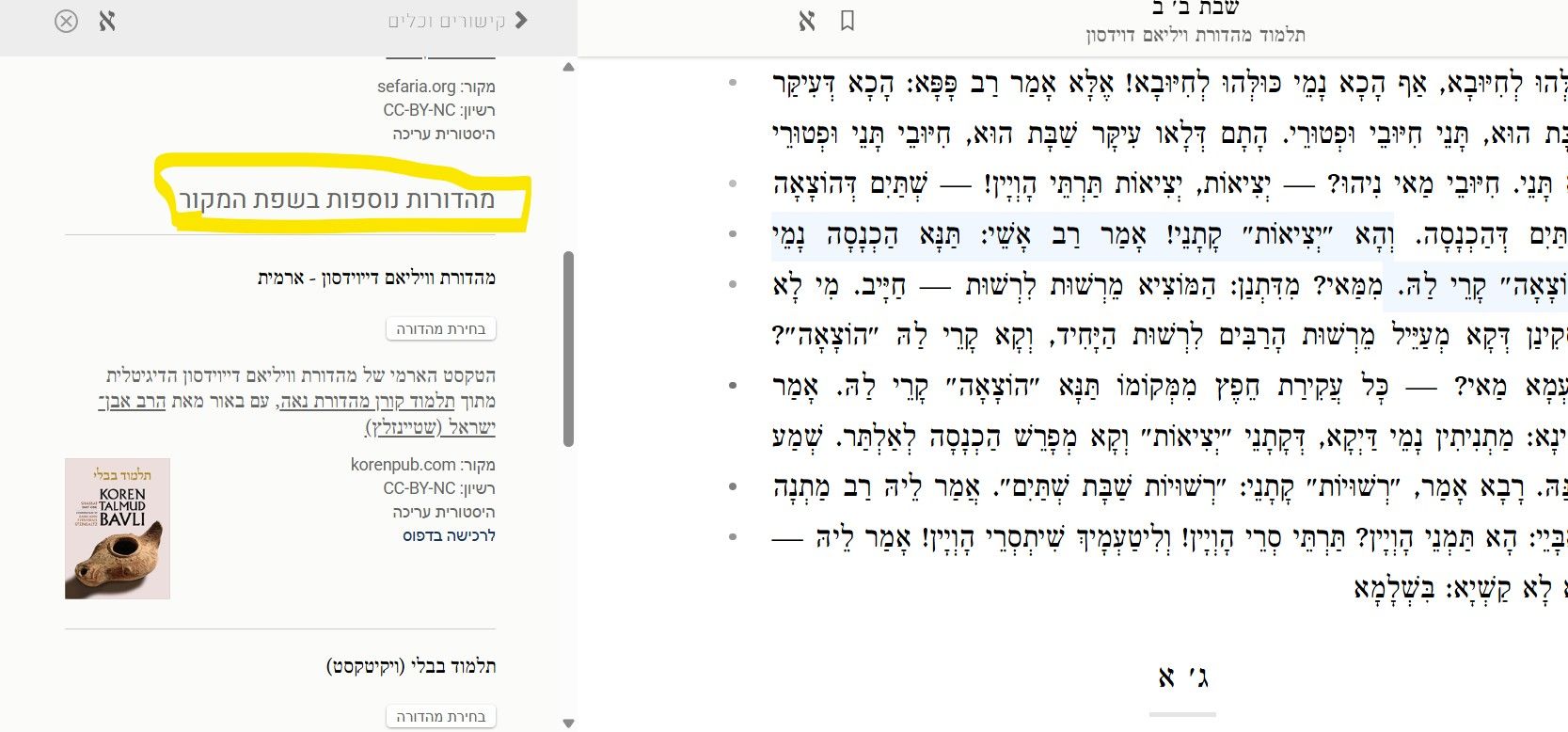
@י.-פל. אני לא מכיר את ספריא, אבל מאמין שיש שם על כל ספר - מידע נוסף, כמו סריקת המקור, סריקות נוספות שקיימות/כל דפוסי הספר שקיימים, וכדומה.
דבר יעיל וחשוב מאוד, יעזור גם למה שביקשו כאן: https://otzaria.org/forum/post/24827 -
-
@י.-פל. אני לא מכיר את ספריא, אבל מאמין שיש שם על כל ספר - מידע נוסף, כמו סריקת המקור, סריקות נוספות שקיימות/כל דפוסי הספר שקיימים, וכדומה.
דבר יעיל וחשוב מאוד, יעזור גם למה שביקשו כאן: https://otzaria.org/forum/post/24827 -
|-|-|-Projects Powered By Sefaria
Below is a partial list of third-party projects created by using Sefaria's API and open-source data. We love to see what other people are building with our materials. If you'd like to be featured on this page, please tell us about your project!Please note: All the projects below are built by individuals unaffiliated with Sefaria. While they rely on our data and API, they represent only the developers who created them. Sefaria is proud to power a diverse collection of projects, as this is a key part of our mission — providing the tech that brings the Jewish people into the digital age. If you encounter any challenges with the tools and products below, please contact the relevant developer.
🔎
Sefaria Team Pick of the Month
Ask the Rambam RAG Tutorial
A retrieval-augmented Q&A tool that answers user questions exclusively from the text of Rambam's Mishneh Torah, ensuring every response is grounded in the source itself rather than generative speculation.DafBuddy
A free platform that supports Gemara learning for students of all backgrounds by drawing on Sefaria’s text and translation API, integrating page-based layouts reflecting the traditional structure of a Talmud page, and offering an AI-powered study companion.In addition to the projects below, there are also 150+ websites using the Sefaria Linker to automatically link textual citations to the Sefaria Library. Learn more and view a list of websites using the Linker >> .
AI Projects
Ask the Rambam RAG Tutorial - A retrieval-augmented Q&A tool that answers user questions exclusively from the text of Rambam's Mishneh Torah, ensuring every response is grounded in the source itself rather than generative speculation.
Build a Torah-Powered AI Chatbot - A tutorial for building a simple Retrieval-Augmented Generation (RAG) chatbot that answers questions using only the Five Books of Moses (Chumash).
ChavrutAI - Free digital platform designed to make the Babylonian Talmud accessible through modern technology and intuitive design.
DafBuddy - A free platform that supports Gemara learning for students of all backgrounds by drawing on Sefaria’s text and translation API, integrating page-based layouts reflecting the traditional structure of a Talmud page, and offering an AI-powered study companion.
Dafyomi AI Summary - Explores, summarizes, and translates key insights from the Talmud.
Darshan AI - A platform that can create an entire lesson with just a few clicks, as well as citing sources and linking to the Sefaria Library.
GoTorah! - Intelligent chat that adapts to each user, offering contextual learning through sage-specific dialogue, chavruta study, and guided discovery. The acclaimed Dvar Torah feature instantly generates ready-to-use, source-based sermons that can be customized according to difficulty, length, and occasion.
Hevruta AI - A beautifully designed web app that pairs learners with an AI study companion for an immersive, chavruta-style Torah learning experience.
Ituria - This AI-agent-based search (GitHub repository) is based on Otzaria.
LadderAI - An ESP32-based physical AI device, offering instant voice and text access to Claude and ChatGPT, and reads Tanakh and Zohar texts available via Sefaria's API aloud to users.
Mishneh AI - This AI-powered Torah study platform offers chavruta-style learning modes, fully cited responses linked to the Sefaria Library, and personalized tools directly connected to foundational Jewish texts.
Orayta: Torah in Your Time - AI-powered learning app that helps busy people integrate Torah study into daily life by providing a tailored learning session with direct links to the Sefaria Library.
PshatGPT - An AI-powered study tool that streams contextual pshat explanations from Claude for any clicked line of gemara, Rashi, Rashbam, or Tosafot, drawing on Sefaria's Talmud Bavli corpus.
RavGPT.ai - An AI model designed to make Torah learning more accessible.
Seferai.org - Helps users explore Jewish texts with AI-powered insights.
Sefaria Chat - This AI-powered tool provides cited, sourced answers to questions about Jewish texts, drawn directly from sources in the Sefaria Library.
Torah Chat - A desktop app that uses AI to support exploration of the Sefaria Library by retrieving cited passages with Hebrew and Aramaic alongside English translations and commentaries. See the source code on Github.
Torah Scholar (OpenClaw/MCP Format) - This AI agent skill (OpenClaw/MCP format) gives AI assistants instant access to the Sefaria Library, allowing users to search texts, retrieve verses in Hebrew and English, find commentaries, and more.
TzadekAI - A halakhic Q&A application using data from Sefaria to explore how rabbinic voices from different historical periods approached similar questions.
Weekday Torah Readings with AI Insights - Provides experimental AI insights for each reading of the weekday Torah readings, alongside the biblical texts in both Hebrew and English.
Yanki - All-in-one app built according to traditional halakhic values, offering secure access to Torah content, mitzvah tools, kosher services, and community features — all in a filtered, AI-powered ecosystem for the frum Jewish world to enjoy.
Learning & Study Tools
AlHaTorah - Tools for studying Tanakh, including biblical commentaries sourced from the Sefaria Library.
AllDaf - Daf Yomi app created by the Orthodox Union with an English translation of the Talmud sourced from the Sefaria Library.
Arukh HaShulchan Yomi - Daily learning about the halakhah (Jewish law) that governs daily life.
Bavli Kilvavi - A website for studying the Babylonian Talmud that brings together Rishonim, Acharonim, biographical details of Tannaim and Amoraim, and much more for a rich and accessible study experience. Available in Hebrew only.
Binata - an AI Torah study assistant that answers questions with sourced references across Torah literature, with a built-in document editor and AI writing tools.
Daf Quiz - Web application that generates a daily multiple-choice quiz based on the relevant page of Talmud, according to the Daf Yomi cycle. (Link to source code: https://github.com/bentekkie/daf_quiz)
Daily Torah Study Trmnl Plugin - Plugin for the Trmnl, which uses Sefaria’s Calendars API to present a daily Torah study schedule.
Derekh Learning - This AI-powered Jewish study companion turns texts from the Sefaria Library into personalized lessons and generates fully linked study guides, reflection prompts, and tools connected to the original sources.
Hadran - An organization dedicated to inspiring women to learn Talmud, providing Daf Yomi classes that use text from the Sefaria Library.
HaTanakh.com - Rich content for studying Tanakh, including biblical commentaries sourced from the Sefaria Library.
IvritSuite.com - A free suite of Hebrew language learning tools for Jewish students, featuring a Torah Trainer that transforms the weekly parasha into interactive reading practice using Sefaria's Tanakh data.
Jastrow App - A progressive web app offering clean, mobile-friendly access to the Jastrow Talmudic dictionary alongside other essential Talmud study resources.
Jastrow Search - A clean, glanceable search engine for the Jastrow Talmud Dictionary, with definitions split for quick scanning. Link to Github: https://github.com/onegkg/Jastrow-Search
Kabbalah of Time Daily Reading - A daily reading guide that uses the Jewish calendar as a lens to unlock the hidden structure and mystical meaning behind sacred texts, powered by Sefaria's Linker.
Kindle Seforim - Makes sources from the Sefaria Library readable on any Amazon Kindle device.
Kitfei Anaqim (כתפי ענקים) - A curated anthology of classical biblical commentary that distills the wisdom of the great commentators across the generations based on the Sefaria library.
Kol Tanakh - An Android app for deep Tanakh immersion featuring the "Davar Motor," a custom byte-precise audio synchronization engine built on Sefaria's API that keeps Hebrew text and audio in perfect word-for-word alignment.
Kol Torah - A structured digital platform that guides students through an independent, step-by-step Bar Mitzvah Torah reading preparation process, available on both iOS and Android.
Koveah - Create your own custom learning schedule using sources from the Sefaria Library.
The Lightweight Hebrew Bible Reader - Enables readers to read, search, and explore the Tanakh with ease. Available both in mobile app and web versions.
Ma'agar HaMekorot HaTorani'im HaMekif - This vast collection of Torah sources, including some from the Sefaria Library, generates responses in a specific rabbi’s own style, creating an immersive learning experience. Available only in Hebrew.
Parasha Sheet Generator - A practical tool that instantly generates a formatted, print-ready handout of the full weekly parasha divided by aliyot, exportable as PDF or ODT using Sefaria's text API.
QuizDrash - A whimsical, quiz-based learning experience that makes exploring Sefaria's texts playful and engaging for all levels. Vibe coded by educators using the Sefaria API.
Schnajim Mikra mit Rav Hirsch - A German-language Shnayim Mikra reader that presents each parasha verse alongside Hebrew, Targum Onkelos, and Rav Hirsch's renowned German translation and commentary, powered by Sefaria's texts and calendar APIs.
Shnayim Mikra - App and interface for learning Torah alongside Rashi’s commentary.
Siddurim.com - Real siddur featuring original pages of the Kavanat Halev siddur, Nusach Edot HaMizrach.
Sidur KTS - a mobile prayer application designed for Spanish speakers who are new to the Western Sephardic tradition.
Talmud.page - A simpler way to read the Talmud (among other texts), optimized for both mobile and web reading experiences.
Tanach Study - Online education platform that revolutionizes the way we study our foundational texts.
Tehillim Reader - A kid-friendly Tehillim reading site that highlights each word or syllable as you navigate via keyboard, mouse, or scroll wheel, with text pre-fetched from the Sefaria API and bundled for fast, offline-capable use. Github documentation
The Daf Yomi Portal - App designed to support daily Talmud study, with English text from the Sefaria Library.
The People's Talmud - Free, searchable online platform offering over 7,500 sections of the Talmud, 3,500 thematic links, and 3,000 one-line brain teasers designed to guide users through the Talmud’s wisdom in a personalized, curiosity-driven way.
Torah Framework - A Torah learning tool that guides you through eight interconnected lenses — from themes and concepts to history and practical skills.
Torah Library Add On for Google Docs - Helps users create beautiful and collaborative source sheets with ease.
TorahApp - Integrates the Sefaria Library with shiurim (lessons) from YUTorah & OUTorah.
TorahSummary - Short summaries of the entire text of the Torah with links to the sources.
Torah Study Tracker- This personal archive for lifelong Torah learning uses the Sefaria API to log your study, track reviews, and create a visual record of your progress over time.
Torah Tree - A Hebrew-first, live collaborative Torah wiki built on the Rambam's hierarchical structure, featuring deep topic trees, real-time editing, and automatic reverse citation indexing powered by Sefaria's texts API.
TorahVerse - an interactive mind map that visualizes texts from the Torah and the Talmud, as well as midrashic, halakhic, and kabbalistic sources, and more as a living, connected whole branching from one shared root.
Yamim Noraim Machzor - App designed to help users learn to lead prayers for Rosh Hashanah and Yom Kippur.
Yuchasin - This project offers a genealogical analysis of Tanakh, incorporating all references in the Talmud to related biblical figures and passages.
Apps & Other Tools
Abba Saul - A mishnah bot for Discord users.
Artscroll Smart Siddur - A siddur app by Artscroll.
Goof - App that shows where parts of the human body show up in liturgical text.
Mishnah.org - Platform that uses texts from the Sefaria Library to support Mishnah study.
Parasha Bytes - Helps users explore the foods of the Torah.
Pninim - Platform that helps users write personal insights on Talmud.
Shitufta - Unique Torah database, in Hebrew, designed according to a traditional page layout.
Shulkhan - A touch interface for the printed Talmud.
The Jewish Story Through Books - Shows where and when Jewish books were published throughout the ages.
Zohar-stories.com - Digital database of the stories of the sages that appear in the Zohar literature.
Bina v’Da’at - Interactive AI-powered Hebrew chatbot designed to support Torah learning.
Tikkun.io - A tool for preparing Torah readings.
Zmanim Checklist - A prayer companion app that combines precise, location-based zmanim with configurable reminders, a daily checklist, and a full multi-nusach siddur powered by Sefaria. (There's also a version for Android, see here).Visualization & Data Analysis
Besasefer- Analytical search engine for exploring the Tanakh.
Gematriaphone - Tool for turning Torah text into music by using Gematria.
Liz Shayne's Visualizations of Sefaria Links - Provides an artistic expression of the interconnections found in the Sefaria Library (code on GitHub).
Quantified Cantillation - Provides users with a way to find out the possibilities of trope sequences as well as the probability of transition from one to another.
Russel Neiss's Micrography - Converts an image and Jewish textual source into a computer-generated micrograph.
Sefer Similarity Map - Uncovers the substructure of Jewish texts and visualizes the underlying relationships between them.
Sefaria Networks - Studies the networks that use Sefaria.
Tanakh Experiments by David Komer - Visualizations based on gematria and color.
The Talmud Commentary Atlas - Visualization of a selection of Sefaria’s data, including five visualizations presenting perspectives about Jewish scholarly commentaries on the Babylonian Talmud.
Visualizations of Sefaria - Provides visualizations of the landscape of Jewish texts.
Eitz HaRabanim - This project uses Sefaria data to create an interactive tree visualization of Talmudic sages, showing their teacher–student relationships and chronological connections, with dedicated pages for each rabbi. Github documentation
Community, Interaction, & Social
AI Supported Chevrusa - AI-powered bot that can answer questions about Jewish texts.
Daily Daf Tracker - AI-powered platform where users can ask questions about daily pages of Talmud
Jew and A - Presents questions with answers from the Jewish library.
Shulert - The ultimate app dedicated to organizing and enhancing your davening experience.
Sefaria Discord Bot with French Support - A multilingual Discord bot that lets users ask questions about the Tanakh and broader Jewish textual tradition in English, Hebrew, or French, drawing on Sefaria's library including its French translations.
T'Feeling - Explores the connections between tefillah (prayer) and emotions.
TorahBot for Mi Yodea - Cite sources and brings texts automatically into Mi Yodea.
Torah Scroll - An online forum that brings Torah texts and community discussion together in one space for collaborative Jewish learning.
Tweet Yomi - Creates daily Torah tweets.
Extensions and API Integrations
Bisl Torah - A developer-focused tool that surfaces a daily bite-sized Torah learning snippet from the Sefaria Library in a popup beside your terminal while an AI coding agent processes your prompt.
Learn - CLI for accessing text from Sefaria in the terminal.
Sefaria Sidebar Extension, code on GitHub - Sidebar that brings up Sefaria resources on other related websites.
I’m Learning Lucky, code on GitHub - Chrome browser extension for Sefaria.org utilizing the Sefaria API to raise fun insights while studying a text on the platform.
Talmud Sidebar Extension, code on GitHub - Brings the comprehensive Sefaria library to any webpage that is learning a specific daf of Talmud.
Alexa Torah Scholar, code on GitHub - Ask Amazon Alexa to recite verses and commentary from Tanakh.
Sefaria Extension for Raycast - An unofficial Raycast extension that provides access to Sefaria.org, the free digital library of Jewish texts, through the Sefaria API.
RecurrentRav, code on GitHub - Recurrent Neural Network generation of pseudo-Mishnah, powered by Sefaria.
Sefaria .NET Framework, code on GitHub
Sefaria Embedded, code on GitHub - A server for generating embeddable iframes for texts via Sefaria API.
Sefaria Wordpress Plugin, code on Github
Shnayim Mikrah - A wrapper over the Sefaria API to enable presenting Shnayim Mikrah text by aliyah.
Yolaroo Library of Jewish Texts, code on GitHub
Sefaria-Container-Unofficial - Builds and publishes a docker container to run Sefaria
Sefaria-Desktop-Unofficial - Desktop app for the Sefaria Library. Work in progress. Currently only Linux-supported.|-יישור לשמאל-|-| -
-
ברוכים הבאים לחיבורים בספריא
מקורתרגוםמקור ותרגום
גודל גופן
שמירה
העתקה
צירוף לאסופה
ייצוא לגוגל דוקס
שיתוף
הבית החדש של יצירה ולימוד תוכן מבוסס מקורות
חיבורים בספריא: המרחב המיועד לחומרים מקוריים
הפלטפורמה המעודכנת של ספריא מחולקת כעת לשלושה מרחבים של הספריה. המרחב שמיועד לתוכן שנוצר על ידי משתמשים הוא: חיבורים בספריא.
חיבורים הוא הבית החדש של עורך הדפים של ספריא, הכלי הוותיק שלנו ליצירת תוכן, שנבנה עבור איסוף מקורות יהדות בפורמט דיגיטלי הניתן לשיתוף.
משמעות הדבר היא שכל הדפים הקיימים שלכם ניתנים כעת לגישה דרך חיבורים, ועדיין מקושרים במלואם לספריית ספריא.
מחפשים תשובות לשאלות נפוצות? גללו מטה לתחתית העמוד.
בין אם אתם משתמשים בעורך הדפים כדי לשתף דבר תורה דיגיטלי עם
חברים, לכתוב מערך שיעור על גלגולו של ט"ו בשבט, ליצור אוסף אישי של מקורות לעיון מאוחר יותר, או לחפש נקודת מבט חדשה ומעניינת על המשמעויות המרובות של מדרש מעניין - עדיין תוכלו לעשות את הכל במרחב החדש והמשודרג הזה!
חיבורים בספריא: כל מה שאתם צריכים לדעת
כל הדפים שלכם נראים אותו הדבר כמו קודם - רק במקום חדש. בנוסף, כל כתובות ה-URL של הדפים הקיימים שלך עודכנו אוטומטית, כך שהם יעבדו בדיוק כמו קודם. פלטפורמות נפרדות = תוצאות נפרדות. כשאתם מחפשים משהו בחיבורים בספריא, תקבלו רק תוצאות של דפים. לעומת זאת, חיפוש בספריית ספריא יציג רק מקורות מהספרייה. מצאו את הדפים והאסופות שלכם בדף הפרופיל החדש שלכם. פשוט לחצו על כפתור הפרופיל שלכם (בפינה השמאלית העליונה של המסך) ובחרו 'פרופיל' כדי לראות את כל מה שיצרתם. פרופיל יצירת התוכן שלכם לא יופיע יותר בספריית ספריא, לכן וודאו שאתה מחוברים לחיבורים בספריא בעת גישה לדפים שלכם. כפתור היצירה מקל מאי פעם על יצירת תוכן חדש. כפתור זה, שנמצא ממש בחלק המרכזי של הממשק החדש של חיבורים בספריא, מוביל אתכם ישירות לעורך הדפים, שם תוכלו לתת ליצירתיות שלכם לזרום. כלי אחד לשיתוף דיגיטלי, כלי אחד להדפסה. אם אתם יוצרים משהו שאתם מתכננים לשתף בסביבה דיגיטלית, עורך הדפים הוא המקום המושלם עבורכם להיות יצירתיים. עם זאת, אם אתם מתכוונים להדפיס עותקים מודפסים, אנו ממליצים לייצא את הגיליונות שלכם לגוגל דוקס ולהשתמש באפשרויות עיצוב הטקסט המתקדמות הזמינות בסביבה זו. תוכלו גם ליצור חומרים ישירות במסמך גוגל דוקס באמצעות התוסף החינמי שלנו, המאפשר לכם להוסיף ציטוטים או להחליף את שם האל לאורך המסמך בלחיצה אחת.מחפשים את כלי ההחלפה של שם האל? כעת תמצאו אותו בתוסף של ספריא עבור הדפדפן גוגל דוקס. מכיוון שמטרת כלי ההחלפה של השם היא בעיקר להימנע מהדפסת שם האל, העברנו אותו לגוגל דוקס, הפלטפורמה המומלצת שלנו להדפסת דפים.להורדת התוסף של ספריא לגוגל דוקס
אנו מקווים שפלטפורמה מעודכנת זו תעזור להעשיר את חוויית הלימוד והשיתוף שלכם במקורות היהדות. אם אתם נתקלים בשאלות, אתם תמיד מוזמנים לעיין במרכז העזרה המעודכן שלנו או לשלוח לנו הודעה במייל לכתובת hello@sefaria.org. נשמח תמיד לעזור לכם בכל אתגר שיתעורר.
אנו נארח מפגש חי ביום ראשון, 19:30 בערב כדי להדריך אתכם כיצד לנווט בספרייה ובעורך הדפים במבנה החדש של האתר. המפגש באנגלית. >>> הירשמו כדי להצטרף אלינו!
ניווט בפלטפורמה המחודשת של ספריא: שאלות נפוצות
שאלות טכניות וגישה
האם אצטרך חשבונות נפרדים על מנת להשתמש בחיבורים בספריא ובספריית ספריא?
התשובה הקצרה היא לא. אם יש לכם חשבון אישי בספריא, תוכלו להשתמש עם אותם פרטים על מנת להתחבר לחשבון בעת השימוש בפלטפורמת "חיבורים בספריא" ובעת העיון בספריית ספריא. עם זאת, המידע הכלול בעמודי הפרופיל בשני הממשקים יהיה שונה. בממשק של ספריית ספריא תוכלו למצוא מידע אישי בעמוד "הגדרות", ואילו בממשק של חיבורים בספריא המידע יימצא בעמוד הנקרא "פרופיל", כאשר לכל עמוד מטרה שונה.
בעמוד הפרופיל בחיבורים בספריא תוכלו:
לגשת ולערוך כל דף או אסופה שיצרתםלעדכן מידע אישי, כמו מקום עבודה, השכלה ופרטים אחרים אודותיכםלשנות תמונת פרופיל וכל קישור למדיה חברתית שתרצו לשתףבעמוד הגדרות החשבון שלכם בספריית ספריא תוכלו:
לקבוע את שפת התרגום המוגדרת כברירת מחדללעדכן את כתובת המייל והסיסמה המשוייכים לחשבון האישילקבוע את המנהג המועדף שלכם לקריאת ההפטרה השבועית (ספרדי או אשכנזי)לראות את היסטוריית הקריאה שלכםלקבוע את תדירות ההתראות המועדפת עליכםמה יקרה לדפים הקיימים שלי?
כל הדפים שיצרתם יועברו אוטומטית לעמוד הפרופיל שלכם בממשק חיבורים בספריא. לא תצטרכו לעשות דבר על מנת לוודא שהכל הועבר.
האם כתובות ה-URL של הדפים הקיימים שלי ישתנו? האם דפים ששיתפתי ושמרתי עדיין ייפתחו כמו קודם?
אכן! דפים שיצרתם יקבלו כתובות URL חדשות, אך אין סיבה לדאגה. כל הקישורים הקיימים יופנו מחדש כך שכל לחיצה של כתובת ישנה תפתח אוטומטית את הדף הרלוונטי במקום הנכון במבנה החדש. דפים חדשים ייווצרו עם כתובת של חיבורים בספריא, כך שהם כבר יהיו במיקום הנכון.
האם ניתן עדיין להוסיף מקורות מהספרייה לדפים חדשים?
בהחלט. המרחב של "חיבורים" מחובר באופן מלא לספריית ספריא, כך שהוספת מקורות מתוך עורך הדפים תעבוד כמו קודם. כשאתם מחוברים לחשבון ספריא החינמי שלכם, עדיין תוכלו להוסיף מקורות לדף מקורות בשתי הדרכים הקיימות. אבל עכשיו שתי האפשרויות נמצאות בשני מיקומים נפרדים:
בספריית ספריא: תוכלו להוסיף מקור לדף חיבורים בספריא על ידי פתיחת סרגל הכלים והקישורים ולחיצה על "הוספה לדף מקורות".
בחיבורים בספריא: תוכלו להוסיף מקור לדף חיבורים בספריא על ידי לחיצה על סמל המרכאות בתוך עורך הדפים והקלדת מראה המקום של המקור המבוקש.
מה שנותר ללא שינוי: בדיוק כמו קודם, כפתור "הוספה לדף מקורות" בספריית ספריא פותח תפריט שבו ניתן לבחור את הדף שאליו תרצו להוסיף את המקור שבחרתם (או אם תרצו, ליצור דף חדש). כמו כן, כמקודם, ברגע הלחיצה על כפתור "הוספה לדף מקורות", תוצג התראה כאשר המקור שלכם נוסף לדף הנבחר.
השינוי הוא לאחר הוספת המקורות! כעת כל הדפים נמצאים בממשק חיבורים בספריא, ולכן כרטיסייה חדשה תיפתח בעת הלחיצה על הכותרת המקושרת של הדף שלכם בהודעת האישור.
שימו לב: אם אינכם מחוברים לחשבון ספריא או אם לא יצרתם חשבון, תופיע חלונית שתבקש מכם להתחבר או ליצור חשבון.
פונקציונליות ותכונות
האם כל התכונות הנוכחיות יישארו כפי שהיו?
המטרה של הארגון מחדש של האתר היא ליצור חוויית משתמש ברורה יותר ולא להפחית את נוחות השימוש. עם זאת, יש כמה שינויים קטנים שאתם עשויים להבחין בהם. חלקם הם תכונות חדשות וחלקם הם שינויים בתכונות קיימות.
בעת השימוש בחיבורים בספריא, תבחינו בשינויים הבאים בתכונות הקיימות:
בעורך הדפים: כלי עריכת שמות הקודש, שנועד לשנות את שמות הקודש הכתובים לאורך הדף בלחיצה אחת, זמין עכשיו רק כחלק מהתוסף שלנו לגוגל דוקס, מכיוון שזו הפלטפורמה המומלצת ליצירת חומרים מודפסים.בעורך הדפים: פעולות שהיו זמינות בעבר בסרגל הכלים והקישורים כעת נגישות על ידי לחיצה על אייקון שלוש הנקודות, שנמצא בפינה השמאלית העליונה של ממשק עורך הדפים. פעולות אלה כוללות: שיתוף, העתקה, עריכת אסופות, ייצוא לגוגל דוקס ומחיקת דף מקורות.בעת הצפייה בדף: כעת נוסף כפתור "הוספה לדף מקורות" מתחת לכל מקור בכל הדפים הקיימים, מה שמקל יותר מתמיד להוסיף מקור מדפים שנוצרו על ידי אחרים אל הדף שלכםבשורת החיפוש ב״חיבורים״: תוצאות החיפוש יציגו תוכן שנוצר על ידי משתמשים בלבד, ללא מקורות מספרים כלשהם ממדפי הספרייה.בעת שימוש בספריית ספריא, תבחינו בשינויים הבאים:
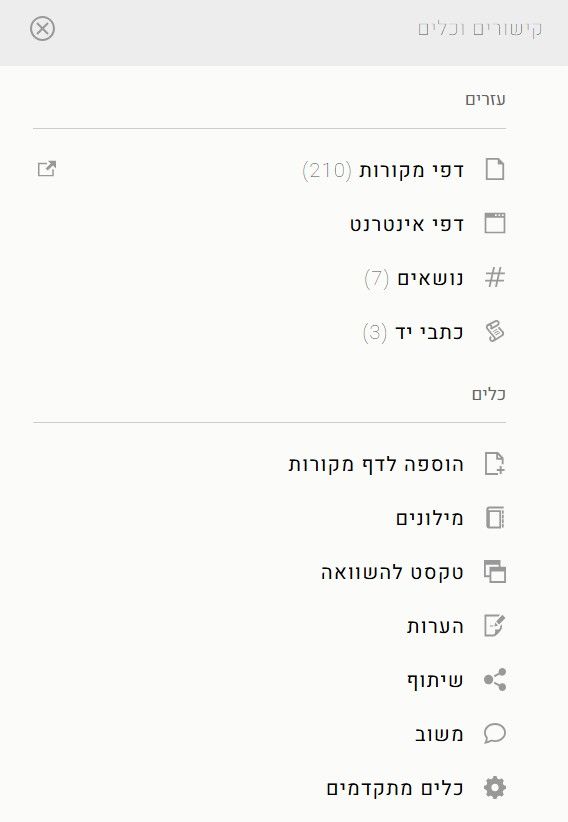
בשורת החיפוש: תוצאות החיפוש יציגוו ספרים ממדפי הספרייה בלבד, ללא תוכן שנוצר על ידי משתמשים.בפתיחת "כלים" בסרגל הקישורים והכלים: בעת חיבור לחשבון האישי שלכם, עדיין תוכלו להשתמש בכפתור "הוספה לדף מקורות" על מנת להוסיף מקורות מספריית ספריא לדף בחיבורים. אך מכיוון שהדפים יהיו כעת במרחב חיבורים בספריא, לחיצה על הכותרת של כל דף שהוספתם אליו מקור תפתח כרטיסייה חדשה בדפדפן שלכם.בפתיחת "עזרים" בסרגל הקישורים והכלים: נמצא עדיין כפתור "דפי מקורות", שמוביל למגוון דפים שנוצרו על ידי משתמשים והם קשורים למקור שאתם לומדים בספריית ספריא. אך מכיוון שהדפים יהיו כעת במרחב חיבורים בספריא, כפתור דפי המקורות בסרגל הקישורים והכלים של ספריית ספריא יפתח כרטיסייה חדשה בדפדפן שלכם שבה יוצגו הדפים הקשורים למקור שבחרתם.בנוסף, הוספנו את התכונות הבאות:
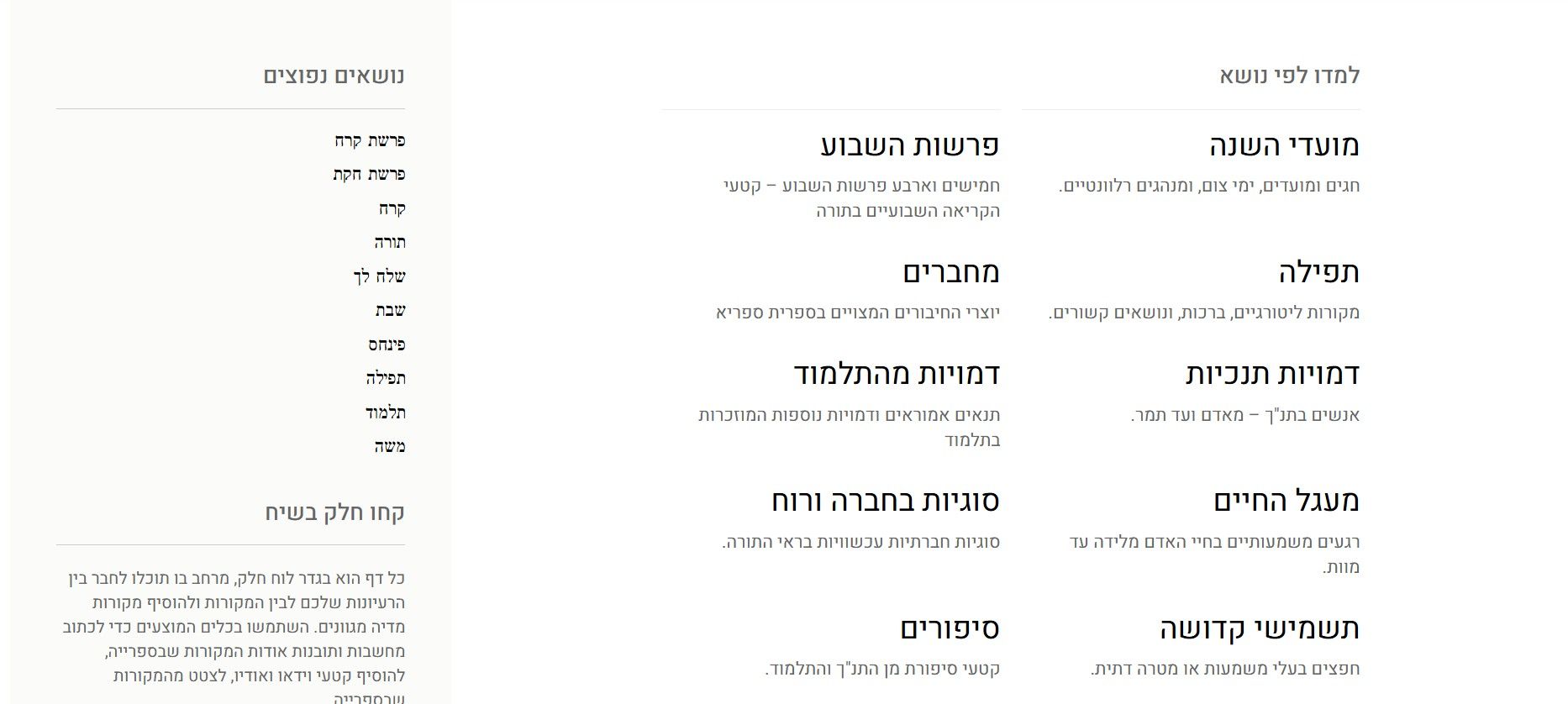
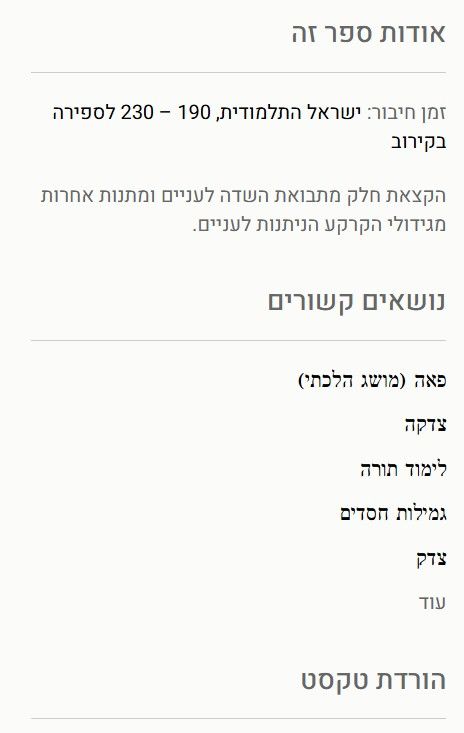
מחליף מוצרים: כפתור זה, הנמצא בפינה השמאלית העליונה של כל שלושת מרחבי ספריא, מאפשר ניווט חלק בין ספריית ספריא, חיבורים בספריא ומפתחים בספריא.ממשק חדש לצפייה בדפים: ממשק זה, הכולל פרטי מחברים וקישורים לדפי נושא רלוונטיים בדפים, נועד להעשיר את חוויית הגלישה בתוכן מקורי. הוא כולל גם תכונות המאפשרות העתקת מקורות ספציפיים או דפים שלמים לפרופיל שלכם, כך שתוכלו להיעזר וללמוד מרעיונות של אנשים אחרים.דף בית חדש עבור חיבורים בספריא: תצוגות יעילות חדשות מציגות את המידע שאתה צריכים על מנת למצוא את הדפי, האסופות והכותבים.עמוד חדש המאורגן לפי נושאים: פריסות חדשות ויעילות מציגות את המידע הדרוש לכם על מנת למצוא את הדפים, האסופות והמחברים שאתם מחפשים.האם ניתן עדיין לקשר בין הספרייה לדפים של "חיבורים"?
בהחלט. חיבורים בספריא וספריית ספריא הם שני חלקים מתוך תשתית אחת מחוברת של ספריא ומקושרים באופן מלא. ניתן לעבור הלוך ושוב בין קריאת מקורות לעבודה על דפים, כאשר שתי חוויות אלה יתקיימו בשתי כרטיסיות שונות. לכן, כאשר תפתחו מקור מתוך בדף של 'חיבורים', הוא ייפתח בכרטיסייה חדשה.
מה לגבי שימוש בנייד?
חוויית השימוש של ספריא בנייד תתמקד אך ורק בספריית ספריא. לא ניתן לגשת לממשק ״חיבורים בספריא״ ביישומון. בדיוק כמו קודם, לא ניתן ליצור דף ביישומון ספריא. אולם, ניתן לגשת לחיבורים בספריא באמצעות דפדפן אינטרנט במכשיר נייד (לדוגמא: ניתן לפתוח את הממשק של חיבורים בספריא באמצעות Google Chrome המופעל במכשיר טאבלט או טלפון נייד).
האם תכונות השיתוף ישתנו?
השיתוף יעבוד באותה דרך כמו עכשיו, כאשר ההבדל היחיד הוא נקודת ההתחלה של השיתוף. מקורות ניתן לשתף מסרגל הקישורים והכלים של ספריית ספריא. ניתן לשתף דפים מתוך תפריט הכלים של חיבורים.
נתונים ופרטיות
האם הגדרות הפרטיות שלי יועברו?
כן, כל הגדרות הפרטיות הנוכחיות שיש לכם בדפים שלכם יועברו בדיוק כפי שהן. תוכלו לעדכן את ההגדרות האלה בדיוק כמו קודם, כאשר ההבדל היחיד הוא שכעת הן נמצאות בתוך ממשק חיבורים בספריא ולא בתוך ספריית ספריא.
איפה אקבע את הגדרות הפרטיות שלי אם הפרופיל שלי נמצא במקום אחר?
כל הגדרות הפרטיות הקשורות לדפים שלכם ינוהלו כעת בבית החדש של הדפים חיבורים בספריא. על מנת לגשת אליהן, לחצו על כל חלק בדף על מנת לפתוח את תפריט הכלים, ואז תוכלו לשנות את ההגדרות של הדף.
תמיכה ולמידה
עם מי אפשר ליצור קשר על מנת לקבל עזרה?
צוות ספריא תמיד כאן על מנת לעזור לפתור כל קושי שאתם עשויים להיתקל בו. אתם תמיד יכולים לשלוח הודעה ל-hello@sefaria.org ואנחנו נשתדל לענות תוך שני ימי עסקים. בנוסף, אנחנו מקווים שמרכז העזרה של ספריא מציע תשובות לשאלות רבות בנוגע לשימוש בממשקי הספרייה, חיבורים בספריא ומפתחים בספריא. -
-
המוצרים של ספריאמדריך למידה: פרקי אבותגרסה ניסיונית
התחילו לחקור
חָדָשׁ! הכירו מחדש את פרקי אבות – והפעם, בעזרת בינה מלאכותית. פרקי אבות היא מסכת במשנה ובה עצות, תובנות על מוסר ומידות ופניני חכמה, ובשל כך כמעט ואין בה פסקי הלכה. כעת, אפשר ללמוד מסכת חשובה זו על ידי לחיצה על שאלות והנחיות שנכתבו בשיתוף צוות הלמידה של ספריא ומודל AI המותאם אישית למשימה. כלי זה נועד לשימוש כל מי שמתעניינים בו, ללא קשר לרמת ההיכרות של עם מקורות היהדות.
תוסף של ספריא לגוגל דוקס
התקינו את התוסף
הכירו את הכלי השימושי ביותר לכל העוסקים בפרויקט כתיבה שכולל מקורות מהספרייה היהודית. תוסף הדפדפן של ספריא מאפשר לשלב ולצטט את מאגר המקורות הנמצאות בספרייה בכל מסמך הנכתב בגוגל דוקס – בלחיצה אחת. אפשרות זו הופכת כתיבה הכוללת את מקורות היהדות לקלה מאי פעם. מדריך למשתמש.
פרויקטים מכח ספריא
נסו את המוצרים שמפתחי תוכנה וידידי ספריא מרחבי העולם בנו עבורכם! גלו את הפרויקטים
היישומון של ספריא
יישומן לאנדרואידיישומון ל-iOS
בדרכים? קחו את כל הספרייה איתכם! כל הספרייה של ספריא זמינה בכל עת בטלפון הנייד בעזרת היישומון שלנו. כאן תמצאו את שלל מקורות היהדות הנמצאים באתר בתרגום לעברית אנגלית ועוד מגוון שפות -- תורה, תלמוד, משנה, קבלה, סידור ועוד. ביישומון תמצאו גם את כל הקישורים, החיבורים והפירושים הרלוונטיים ללימוד המקורות. כמו כן באפשרותכם להורידאת הספרייה כולה לנייד כדי ללמוד בכל מקום ובכל זמן, גם בלי חיבור לאינטרנט.קראו עוד.
תורה טאב
התקן לכרוםהתקן לפיירפוקס
הוסיפו רגע של תורה ליום שלכם. בהורדת התוסף ״תורה טאב״ לדפדפן, ייפתח מקור קצר כדי לעורר את סקרנותכם בכל פעם שתפתחו כרטיסייה חדשה בדפדפן האינטרנט. זוהי דרך קלה להוסיף לימוד מקורות ליום שלכם.
ממשק API פתוח לכל
דוקמנטציית API
השתמשו בקוד הפתוח שלנו כדי לבנות טכנולוגיה תורנית משלכם. ה-API של ספריא מאפשר גישה למאגר המידע המובנה של המקורות בספרייה ולכל הקשרים ביניהם. הכל מתועד ומונגש בפורטל המפתחים החדש של Sefaria, שם תמצאו את כל פרטי ה-API, יחד עם הסברים. הפורטל מיועד להפוך את העבודה על אפליקציה חדשה לאינטרנט או לנייד לפשוטה ככל האפשר.
לינקר
למדו עוד
חברו את האתר או היישומון שלכם לספרייה - זה קל! בעזרת הלינקר של ספריא, תוכלו לשלב את המקורות שבספריא לאתר האינטרנט שלכם באופן חלק, המזהה הפניות למקורות והופך אותן לקישור. כלי חדשני זה מחבר את המשתמשים באתרים שיש בהם ציטוט או איזכור של מקורות יהדות לספרייה של ספריא, ובכך מעשיר את חווית הלמידה של כל קורא וקוראת. -
AI on Sefaria Sefaria’s mission is to take the People of the Book into the digital age, and it is our responsibility to explore how to best leverage technologies to create new ways to access, search, discover, and understand Jewish texts. Our founders’ foresight in making Jewish texts machine-readable continues to enable Sefaria — and others — to take advantage of technological advancements such as artificial intelligence (AI) and, specifically, large language models (LLMs).
Pirkei Avot 1:1
Moses received the Torah at Sinai and transmitted it to Joshua, Joshua to the elders, and the elders to the prophets, and the prophets to the Men of the Great Assembly. They said three things: Be deliberate in justice, establish many students, and make a fence around the Torah.
Sefaria is part of this long and storied history of transmitting Jewish tradition, holding sacred the texts in our library. As we experiment with and introduce AI-generated content to the Sefaria library, we are committed to specific guardrails, effectively making a fence around the Torah. We have established the following guidelines for Sefaria’s use of AI:
Transparency: Sefaria will always be transparent about how, where, why, and when AI is being used. This includes clearly marking pages with an AI icon when they include AI-generated content. We currently use two icons to designate AI-generated content. Learning First: AI content on Sefaria will aim to act as a learning resource and not as a replacement for your rabbis, halakhic advisors, or teachers. Continued Evaluation: Sefaria will continually monitor new technologies and our use of them to ensure we serve our users in the best possible way. Feedback: Sefaria is proactively soliciting user feedback regarding AI-generated content. Users are invited to provide corrections and feedback using a dedicated AI feedback form. In addition, Sefaria agrees to adhere to the Rome Call for Artificial Intelligence Ethics, which has been adopted by organizations around the world, such as the Chief Rabbinate of Israel, Yeshiva University (among other academic institutions), the Rabbinical Alliance of America, and major corporations like Microsoft, Google, IBM, and Cisco.
AI on Topic Pages You will now find AI-generated content on approximately 1,000 of our 5,000 Topic pages. These pages are marked with an AI symbol (AI) on the top right corner.
On each page, users will find a series of sources (individual selections of texts from the library) related to the topic. These sources have been curated by AI to provide a broad selection of relevant and important sources. Each source includes an AI-generated heading and introduction to make it more digestible to learners of all backgrounds. Editors have given some level of review to both of these elements to ensure accuracy and relevance. Many AI-generated Topic pages also include an overview paragraph written by our learning team.
The basis for this AI work was developed by Sefaria’s learning team, which includes seasoned scholars, editors, and translators, in collaboration with a team of engineers dedicated to this specific project. After developing the framework for these pages, our learning team created detailed criteria and prompts for an AI algorithm to reproduce their content creation process. Of the 15,500 source introductions on AI-generated pages, 14,000 were reviewed and edited by Sefaria team members.
Should you encounter anything that seems amiss, we encourage you to let us know by filling out this short feedback form. Your feedback is crucial to our ongoing efforts to ensure accuracy and uphold our commitment to quality on Sefaria.
ANATOMY OF AN AI-GENERATED TOPIC PAGE
AI-Assisted Translation Translations are an important component of the Sefaria Library, making Jewish texts — the collective inheritance of the Jewish people — more discoverable and accessible. With AI, we've identified an opportunity to increase translation availability.
Since 2023, our team of text specialists has experimented with translation using various AI models, assessing for accuracy and fidelity to the original text. As of early 2026, we have released our first AI-assisted translation: an English translation of the Kli Yakar Torah commentary, which was originally translated by Claude 3.7 and then underwent a comprehensive, six-month editing process led by Sefaria Translation and Research Specialist Francis Nataf. The editing process included meticulous review of every word of the translation, comparing it to the original Hebrew. Inaccurate words or passages were retranslated, and additional work was done to improve stylistic consistency across the text. The translation is marked with the star-shaped AI symbol (✧) to indicate that there was AI involvement in its production.
AI Research & Development As leaders at the intersection of Torah and technology, Sefaria will continue exploring cutting-edge developments, keeping you informed of our progress. Below are two projects we’re currently working on; other projects remain in stealth mode.
PUBLIC BETA: PIRKEI AVOT LEARNING GUIDE Sefaria’s experimental Pirkei Avot Learning Guide aims to make this popular text more accessible to learners of all levels. Sefaria’s engineering and learning teams leveraged AI to create this interactive learning tool.
The Guide summarizes the various commentaries on Pirkei Avot from the Sefaria library, presenting them through an interactive interface. When learners click on any teaching in Pirkei Avot, they are presented with a selection of questions. The interface allows users to explore these questions, providing summarized answers drawn from the commentaries along with links to the commentary in the library. To build this feature, each mishnah (section of the text) and its associated commentaries were input into Google’s Gemini AI model. A prompt was used to identify questions that were a matter of discussion or debate among the commentaries, and to generate summaries of each answer.
Recognizing that even AI-generated content benefits from editorial review, we took all of the output from Gemini and fed it to Claude Opus 3, an AI model developed by Anthropic. We asked Claude to review each commentary alongside the questions and summaries generated by Gemini and judge them on two scales — relevance of the answer to the question, and accuracy of the summary of the commentary, giving each of them a score of one to 10. While all of the content received some level of human review, our learning team was able to use these scores to identify content that needed an especially close look. Anything with a score of five or below received another review to ensure both accuracy and accessibility for learners.
Visit the Learning Guide.
AI ON VOICES In the Sefaria Library, users can use the Resource Panel to locate user-created Sheets from Voices on Sefaria that relate to a selected passage of text. When viewing Sheets related to a specific passage from the Library, users then have the option to sort Sheets by relevance — a feature that utilizes large language models (LLMs) to assess the content's relevance to the passage at hand. Alternatively, results can be sorted in two non-AI powered ways: by number of views or by publication date.
We took on this project to better support users in finding the content they're looking for. When learners look for Sheets through the Library's Resource Panel, they are looking for Sheets related to a particular passage of text; therefore, we recognized that ranking results based on the actual content of the Sheets — rather than view count or publication date — would be a more effective way for users to locate the most meaningful content for their purposes.
Our experimental solution uses the following criteria to determine a Sheet's relevance:
Is that exact citation present in the Sheet? How central is that citation to the overall content of the Sheet? Besides the textual source, what other content did the Sheet creator include? The volume and nature of the other content is used to determine a creativity score. How engaging and closely related to the passage at hand is the title? Ultimately, this feature will help users more quickly and effectively find user-created content to aid in their exploration of original sources. -
-
-
-
-
-
-






 )
)
שלום! נראה שהשיחה הזו מעניינת אותך, אבל עדיין אין לך חשבון.
נמאס לכם לגלול בין אותם הפוסטים בכל ביקור? כשנרשמים לחשבון, תמיד תחזרו בדיוק למקום שבו הייתם קודם, ותוכלו לבחור לקבל התראות על תגובות חדשות (בין אם במייל, ובין אם בהתראת פוש). תוכלו גם לשמור סימניות ולפרגן ב-upvote לפוסטים כדי להביע הערכה לחברי קהילה אחרים.
בעזרת התרומה שלך, הפוסט הזה יכול להיות אפילו טוב יותר 💗
הרשמה התחברות